



本文仅仅适用于在ChatAI应用中添加自定义模型的用户!!!
如果你不知道ChatAI是什么,请移步:https://www.bandbbs.cn/resources/5151/
如果你不会搭建中转站,请移步:https://www.bandbbs.cn/threads/24134/
新版本V1.1.1的chatai已经支持两种自定义模型方式,并且新版v1.1.1以及旧版v1.0.1均支持最新的中转代码,只不过旧版的chatai无法自定义模型。
自定义的模型需要符合openai的api调用结构。
两种方式:
①在手表端自定义
②在中转站自定义
首先讲解①在手表端自定义
新版界面点击厂商会切换出自定义1、自定义2、自定义3,三种空白内容(可以添加三个模型),并且会多出标识,URL,模型等信息框。
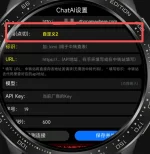
手表端自定义的需要正确填写URL以及模型名称,标识随便填写,对于需要填写的内容可以从各厂商的API文档中看到,例如:
deepseek:
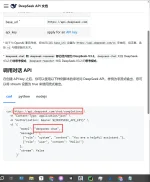
从上图我们可以获知所需信息:
URL:https://api.deepseek.com/chat/completions
模型:depseek-chat (可以填写其他的,必须是存在的、例如deepseek-reasoner)
kimi:
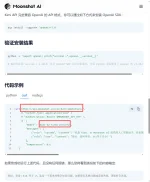
所需信息:
URL:https://api.moonshot.cn/v1/chat/completions
模型:kimi-k2-turbo-preview (必须一字不差)
等等,诸如此类,就从各厂家的API文档中查询,选择curl查看完整的url,并输入到手表中即可,输入正确的api key验证即可。
②在中转站自定义
中转站更新后部分代码如下
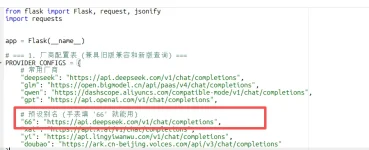
手环的填写如下:
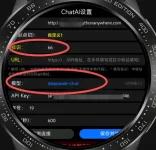
从上图我们可以知道,中转站填写的是一个deepseek的自定义api,别名为 66,手表中的标识为 66,二者相互对应,模型的填写步骤不变,依旧是从厂商API文档中查看,那么类似的,我们可以自定义一个kimi的api,如下
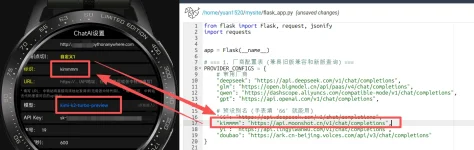
无论别名是什么,只需要保证别名与手表的标识一一对应,并且别名后面的api网址正确,以及模型选择正确即可,具体操作就是这样,因为我也没有kimi的api无法实验。
注意事项:
①依旧是必须查看
这个网址支不支持你所填写的api网址进行访问。
②代码如下
注意!!!!厂商api地址的最后一个没有逗号!
如果你不知道ChatAI是什么,请移步:https://www.bandbbs.cn/resources/5151/
如果你不会搭建中转站,请移步:https://www.bandbbs.cn/threads/24134/
新版本V1.1.1的chatai已经支持两种自定义模型方式,并且新版v1.1.1以及旧版v1.0.1均支持最新的中转代码,只不过旧版的chatai无法自定义模型。
自定义的模型需要符合openai的api调用结构。
两种方式:
①在手表端自定义
②在中转站自定义
首先讲解①在手表端自定义
新版界面点击厂商会切换出自定义1、自定义2、自定义3,三种空白内容(可以添加三个模型),并且会多出标识,URL,模型等信息框。
手表端自定义的需要正确填写URL以及模型名称,标识随便填写,对于需要填写的内容可以从各厂商的API文档中看到,例如:
deepseek:
从上图我们可以获知所需信息:
URL:https://api.deepseek.com/chat/completions
模型:depseek-chat (可以填写其他的,必须是存在的、例如deepseek-reasoner)
kimi:
所需信息:
URL:https://api.moonshot.cn/v1/chat/completions
模型:kimi-k2-turbo-preview (必须一字不差)
等等,诸如此类,就从各厂家的API文档中查询,选择curl查看完整的url,并输入到手表中即可,输入正确的api key验证即可。
②在中转站自定义
中转站更新后部分代码如下
手环的填写如下:
从上图我们可以知道,中转站填写的是一个deepseek的自定义api,别名为 66,手表中的标识为 66,二者相互对应,模型的填写步骤不变,依旧是从厂商API文档中查看,那么类似的,我们可以自定义一个kimi的api,如下
无论别名是什么,只需要保证别名与手表的标识一一对应,并且别名后面的api网址正确,以及模型选择正确即可,具体操作就是这样,因为我也没有kimi的api无法实验。
注意事项:
①依旧是必须查看
Allowlisted sites for free users: PythonAnywhere
Allowlisted sites for free users: PythonAnywhere
www.pythonanywhere.com
②代码如下
代码:
from flask import Flask, request, jsonify
import requests


app = Flask(__name__)

# === 1. 厂商配置表 (兼具旧版兼容和新版查询) ===
PROVIDER_CONFIGS = {
    # 常用厂商
    "deepseek": "https://api.deepseek.com/v1/chat/completions",
    "glm": "https://open.bigmodel.cn/api/paas/v4/chat/completions",
    "qwen": "https://dashscope.aliyuncs.com/compatible-mode/v1/chat/completions",
    "gpt": "https://api.openai.com/v1/chat/completions",

    # 预设别名 (手表填 '66' 就能用),doubao与yi仅做示例,不确定网址支不支持
    "66": "https://api.deepseek.com/v1/chat/completions",
    "kimmmm": "https://api.moonshot.cn/v1/chat/completions",
    "yi": "https://api.lingyiwanwu.com/v1/chat/completions",
    "doubao": "https://ark.cn-beijing.volces.com/api/v3/chat/completions"
}

# === 2. 文本清洗 ===
def format_table_to_text(text):
    try:
        lines = text.split('\n')
        new_lines = []
        in_table = False
        for line in lines:
            stripped = line.strip()
            if stripped.startswith('|') and stripped.endswith('|'):
                if not in_table:
                    in_table = True
                    new_lines.append("\n[表格]:")
                else:
                    new_lines.append(stripped)
            else:
                if in_table: in_table = False
                new_lines.append(line)
        return "\n".join(new_lines)
    except:
        return text

@app.route('/api/proxy', methods=['POST'])
def proxy_request():
    try:
        data = request.get_json()
        if not data: return jsonify({"success": False, "error": "No JSON"}), 400

        api_key = data.get('apiKey')
        model = data.get('model', 'deepseek-chat').strip()
        messages = data.get('messages', [])

        custom_url = data.get('customUrl', '').strip()
        vendor_tag = data.get('vendor', '').strip().lower()
        client_max_tokens = data.get('max_tokens')

        target_url = ""

        # 1. 优先使用手表传来的完整 URL (手表端完全自定义)
        if custom_url.startswith("http"):
            target_url = custom_url
            print(f"路由: 使用自定义URL -> {target_url}")

        # 2. 其次使用厂商标识查表 (中转端预设)
        elif vendor_tag and vendor_tag in PROVIDER_CONFIGS:
            target_url = PROVIDER_CONFIGS[vendor_tag]
            print(f"路由: 厂商标识命中 [{vendor_tag}] -> {target_url}")

        # 3.  (兼容旧版手表,通过模型名猜)
        else:
            target_url = PROVIDER_CONFIGS["deepseek"]
            model_lower = model.lower()
            for key, url in PROVIDER_CONFIGS.items():
                if key in model_lower:
                    target_url = url
                    print(f"路由: 旧版兼容/模型匹配 [{key}] -> {target_url}")
                    break

        headers = {
            "Content-Type": "application/json",
            "Authorization": f"Bearer {api_key}"
        }

        payload = {
            "model": model,
            "messages": messages,
            "stream": False
        }

        # 优先使用手表设定的字数
        if client_max_tokens:
            payload["max_tokens"] = int(client_max_tokens)
        else:
            if "reasoner" not in model.lower() and "o1" not in model.lower():
                payload["temperature"] = 0.7
                payload["max_tokens"] = 2000
            else:
                 payload["max_tokens"] = 5000

        response = requests.post(target_url, json=payload, headers=headers, timeout=120)

        if response.status_code == 200:
            try:
                upstream_data = response.json()
                final_text = ""

                if 'choices' in upstream_data and len(upstream_data['choices']) > 0:
                    message = upstream_data['choices'][0].get('message', {})
                    final_text = message.get('content', '')
                    if not final_text and message.get('reasoning_content'):
                         final_text = "[思考过程]\n" + message.get('reasoning_content')

                clean_text = format_table_to_text(final_text)

                return jsonify({
                    "success": True,
                    "pure_reply": clean_text,
                    "model_used": model
                })
            except Exception as e:
                print(f"解析错误: {e}")
                return jsonify({"success": False, "error": f"Parse Error: {str(e)}"})
        else:
            return jsonify({"success": False, "error": f"API Error {response.status_code}: {response.text}"})

    except Exception as e:
        return jsonify({"success": False, "error": f"Server Error: {str(e)}"}), 500
注意!!!!厂商api地址的最后一个没有逗号!
最后编辑: